The best free 2027 Notion planner for a calm year
Goals that fill up as you tick tasks, habits with real streaks, a Monday to Sunday weekly planner and the whole year on one page. Free, and it works on the free Notion plan.
One click to duplicate. No email, no trial.
What a 2027 planner actually needs
Most free planners look lovely on day one and are abandoned by March. Before you pick one, check it does these five things.
- It forgives missed weeks. Views should open on today and this week, not on a wall of empty boxes from the days you skipped.
- Goals move on their own. If you have to type a progress percentage by hand, you will stop updating it. Ticking a task should move the goal.
- Habits show streaks, not a grid. A 365 row checkbox table is a chore. A card with a streak and a weekly count is a reason to come back.
- Dates you care about come to you. Birthdays and events should surface before they happen, not sit buried in a calendar.
- It is simple enough to keep. Five clear pages beat twenty half used ones. If setup takes an afternoon, it will not last the year.
What's inside the 2027 Life Planner
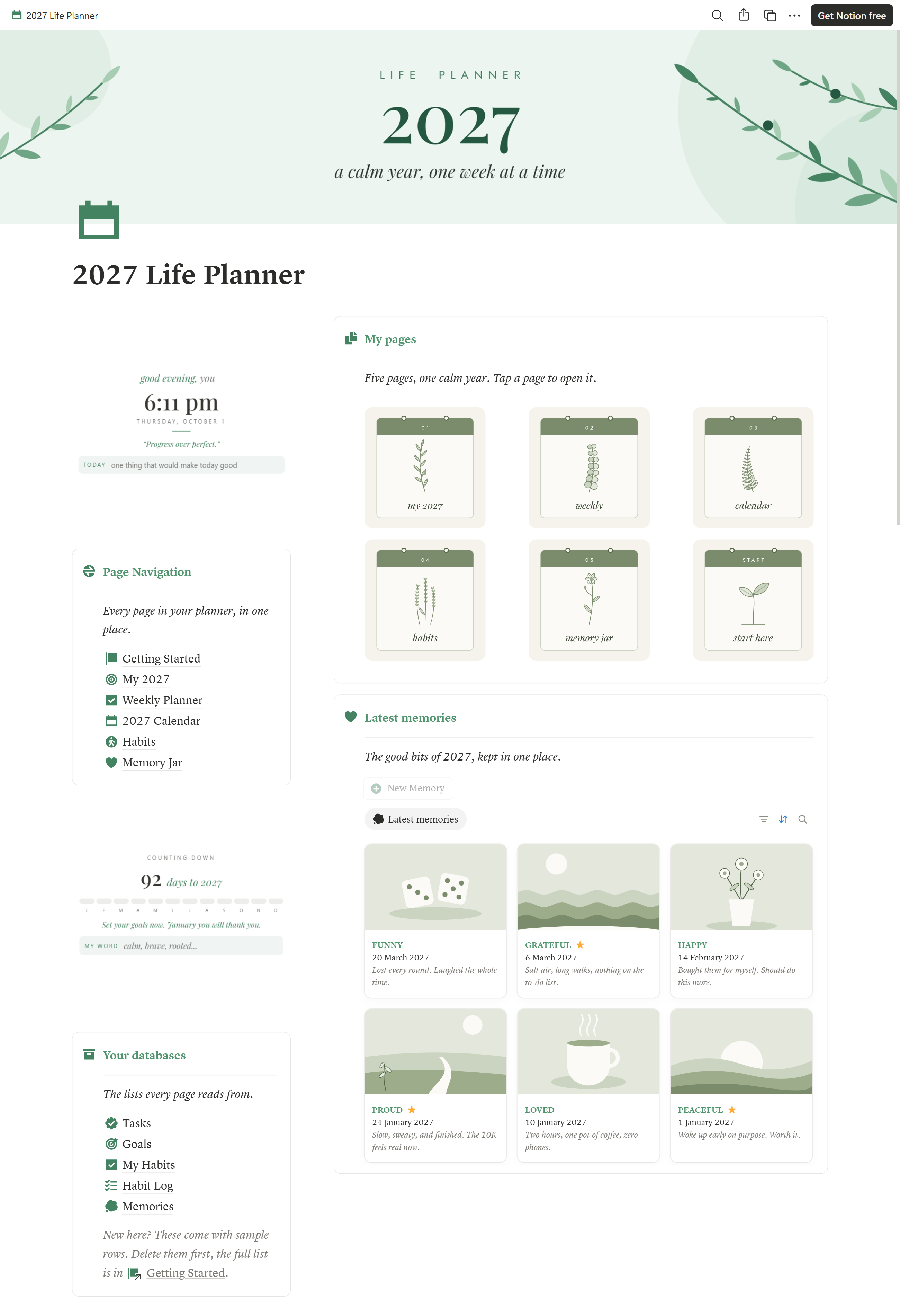
One dashboard, five pages and a five minute setup guide. Everything links together, so you plan in one place and it shows up everywhere it should.
Your year at a glance
A greeting with a daily line, a year progress bar, today's tasks, this week, goals in motion, habits and your latest memories.
My 2027
Your word for the year, a goodbye to 2026, up to five goals with a reason for each, and every next step in one list.
Weekly Planner
A Monday to Sunday board plus Today, Next Week, an Inbox for brain dumps and a Done list for slow days.
2027 Calendar
Every task, event and birthday by month, plus a tap to mark year at a glance you can fill in as the year goes.
Habits
Add any habit, log it with one tap and watch the streak, weekly leaves and monthly count update themselves.
Memory Jar
A photo, a line and a feeling for the good days, sorted by mood, plus a letter to open on 31 December.
How it works day to day
The planner does the bookkeeping so you only do the living.
Goals that fill up
Link a task like "Easy 3K run" to a goal like "Run my first 10K". Tick it and the goal's leaf bar grows. You always know how close you are without updating anything.
Habits with streaks
Each habit is a card with a Done today button. It shows a leaf for each day this week, your current streak and your monthly total. Set a weekly target you can hit on a tired week.
Today catches what slipped
Anything overdue shows up in Today next to what is due now. Move it, do it or let it go. No guilt pile.
Coming up, soonest first
Set a task's type to Event or Birthday and it appears in the Coming Up list on your dashboard, so you never miss a date again.
Compared with a typical free planner
Based on what most free Notion planners include. Check any planner you are considering against the same list.
| Feature | Typical free planner | 2027 Life Planner |
|---|---|---|
| Goal progress | Typed by hand, or not tracked | Fills up from ticked tasks |
| Habit tracking | Daily checkbox grid | One tap log with streaks and weekly target |
| Missed a week | Empty days pile up | Opens on today and this week |
| Birthdays and events | Inside a calendar | Coming Up list on the dashboard |
| Setup | Figure it out yourself | Five minute guide, sample data clearly marked |
| Price | Free | Free |
Is it right for you?
Great fit if you
- Want one place for goals, weekly plans, habits and memories
- Have tried planners before and dropped them by spring
- Like a calm, clean look over a busy one
- Use Notion on your phone as much as your laptop
Not the right fit if you
- Need detailed budgeting or finance tracking
- Want hour by hour time blocking for every day
- Manage a team project rather than your own life
Set up in five minutes
- Duplicate it. Open the template on the Notion Marketplace and click Duplicate. It lands in your workspace.
- Clear the sample rows. The Getting Started page lists every database with the example rows to delete.
- Fill in My 2027. Your word, your three things that matter and up to five goals.
- Empty your head into the Inbox. Then give a few tasks a day this week.
- Pick your habits. Rename the starters or add your own and set a weekly target.
Questions, answered
Is this 2027 Notion planner really free?
Yes. It is free on the Notion Marketplace and works on the free Notion plan. There is no trial and nothing locked behind a paywall.
Does it work on the free Notion plan?
Yes. Every page, view, formula and button works on a free Notion account, on desktop and on the Notion mobile app.
Can I start using it before January 2027?
Yes. The year progress widget counts down to 2027 until January, and the weekly planner works from the day you duplicate it, so you can set goals and plan in late 2026.
How does goal progress work?
Each goal is linked to the tasks that move it forward. When you tick a linked task as done, the goal progress bar fills up on its own. No manual percentages.
How is the habit tracker different from a checkbox grid?
Each habit is a card with a Done today button. The card shows a leaf for every day you did it this week, your current streak and your count for the month. You can add as many habits as you like and set a weekly target for each.
What happens if I stop using it for a few weeks?
Nothing breaks. Every view opens on today and the current week, so there is no backlog of empty days. Anything overdue shows up in Today so you can move it or let it go.
Can I use it again for 2028?
The structure works for any year. Clear the old rows, rename the year on your pages and keep going.
Make 2027 the calm year
Goals that move, habits that stick and a week you can actually see. Free to duplicate today.
Get the 2027 planner freeWant a system built around a specific life or business? Browse the full NotoMantra template collection.